В этой статье будет продемонстрирована выгрузка клиент-серверной базы 1С помощью утилиты командной строки ibcmd на Linux.
Архив автора: admin
Что такое GitHub Actions? (С 2 примерами)
GitHub Actions — это новая служба непрерывной интеграции и непрерывной доставки сервисов (CI/CD) от GitHub, которая позволяет автоматизировать конвейер сборки, тестирования и развертывания.
С помощью GitHub Actions вы можете создавать автоматизированные конвейеры, которые можно тестировать, создавать и развертывать при каждом push-запросе в ваш репозиторий.
Непрерывная интеграция и непрерывная доставка (CI/CD) являются ключевыми практиками для современных команд разработчиков программного обеспечения. CI/CD позволяет автоматизировать создание, тестирование и развертывание изменений кода для ускорения циклов выпуска.
Что такое GitHub Actions?
GitHub Actions — относительно новый, но мощный проигрыватель в пространстве CI/CD. Он позволяет вам создавать пользовательские автоматизированные рабочие процессы непосредственно в ваших репозиториях GitHub.
С помощью GitHub Actions вы можете настраивать пользовательские рабочие процессы, используя файлы YAML, сохраненные в вашем репозитории. Эти файлы рабочего процесса могут запускаться при различных событиях, таких как запуск кода, запросы на извлечение и выпуски.
Задания и шаги, определенные в рабочих процессах, могут использовать действия GitHub из marketplace или запускать пользовательские скрипты и контейнеры.
Ключевые концепции действий GitHub
Некоторые ключевые концепции GitHub Actions включают:
Рабочий процесс
Рабочий процесс — это автоматизированный процесс, который вы можете настроить в своем репозитории для сборки, тестирования, упаковки, выпуска и развертывания вашего кода. Рабочие процессы определяются с использованием синтаксиса YAML и хранятся в виде файлов в каталоге .github/workflows.
Событие
Событие — это конкретное действие, которое запускает рабочий процесс. Например, распространенными событиями являются push, pull_request и release. Вы можете настроить рабочий процесс для запуска при возникновении одного из этих событий в вашем репозитории.
Задание
Задание — это набор шагов в рабочем процессе, которые выполняются в одном и том же исполнителе. В рабочем процессе может быть несколько заданий, которые выполняются последовательно или параллельно.
Шаг
Шаг — это отдельная задача, которая может запускать команды или действия. Шаги можно использовать повторно, комбинировать и упорядочивать для создания заданий.
Экшен
Действия — это автономные команды, которые можно объединить в шаги и задания. GitHub предоставляет множество готовых действий для общих задач, или вы можете создавать свои собственные пользовательские действия.
Runner
Runner — это сервер, на котором установлено приложение GitHub Actions runner. Оно прослушивает доступные задания, выполняет по одному заданию за раз и сообщает о ходе выполнения, журналах и результатах в GitHub.
Вы также можете использовать автономные раннеры для запуска своих рабочих процессов.
Действия GitHub: пример рабочего процесса
Пример рабочего процесса с 1 заданием
Вот пример рабочего процесса, который проверяет наличие версии ОС всякий раз, когда код передается в ветку:
name: GH Actions Demo


on: push


jobs:


  build:

    runs-on: ubuntu-latest


    steps:

    - uses: actions/checkout@v2

    - name: OS Release check

      run: cat /etc/os-release
Это простейший файл YAML рабочего процесса, содержащий только 1 задание. В рамках одного рабочего процесса может быть несколько заданий, и они могут выполняться параллельно или зависеть друг от друга.
В этом рабочем процессе есть 1 задание – сборка. Задание сборки проверяет код и проверяет версию ОС с помощью команды cat.
Рабочий процесс будет выполняться каждый раз, когда код передается в ветку, где он присутствует. Вы также можете изменять его для каждого запроса на извлечение, слияние или даже запускать рабочий процесс по расписанию.
Изменить событие запуска или добавить дополнительные задания в GitHub Actions просто.
Пример рабочего процесса с 2 заданиями с зависимостью
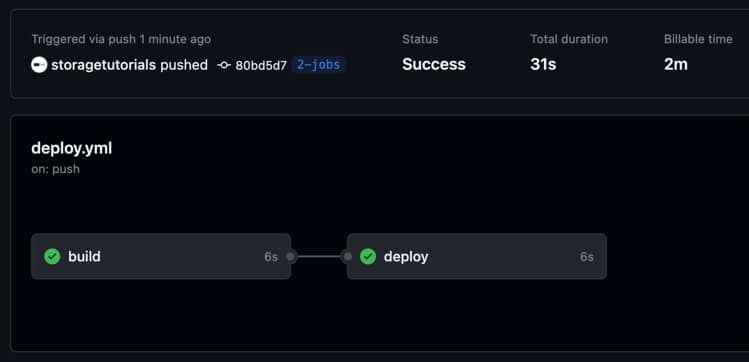
Вот пример рабочего процесса, который содержит 2 задания. Задание “развертывание” зависит от задания “сборка”.
name: GH Action Demo


on: push


jobs:


  build:

    runs-on: ubuntu-latest


    steps:

    - uses: actions/checkout@v2

    - name: Run Task 1

      run: echo ---- Running Task 1 ---


  deploy:

    runs-on: ubuntu-latest

    needs: [build]

    steps:

    - uses: actions/checkout@v2

    - name: Run Task 2 - Random Commands

      run: |

         echo ---- Running Task 2 ---

         pwd

         ls

         uname -a
В приведенном выше примере сначала будет запущено задание “build”, а после его успешного завершения будет запущено задание “deploy”. Это простой файл рабочего процесса, и вы можете включить в него любые команды, чтобы автоматизировать процесс развертывания.
Например, создание артефактов или образов docker в первом задании, а затем отправка их в реестр docker, ECR или в корзину S3.
На приведенном ниже скриншоте показано, как это выглядит в конвейере GitHub Actions.
Основные преимущества GitHub Actions
Некоторые ключевые преимущества GitHub Actions включают:
- Автоматизируйте свои конвейеры CI/CD
- Протестируйте в нескольких версиях вашей среды выполнения, например Node.js, Python и т. д
- Развертывание в нескольких средах, таких как разработка, промежуточная и производственная
- Интеграция с другими функциями GitHub, такими как запросы на извлечение
- Расширяйте действия с помощью контейнеров JavaScript или Docker
- Богатая экосистема сторонних действий
- Гибкие рабочие процессы с использованием синтаксиса YAML
Заключение
Вкратце, GitHub Actions — это мощная платформа для автоматизации жизненного цикла разработки программного обеспечения. Используя рабочие процессы и готовые действия, вы можете легко создавать, тестировать и развертывать. Гибкий синтаксис YAML позволяет легко настраивать конвейеры для нужд вашего
2023-09-29T10:41:00
Программирование
Как проверить состояние батареи на ноутбуке в Windows 11
За аккумулятором ноутбука надо следить, ведь он со временем изнашивается и теряет свою ёмкость. А это ведёт к тому, что время автономной работы, то есть работы без подключения к зарядке, быстро сокращается. Чтобы проверить состояние батареи ноутбука и оценить её износ, не обязательно пользоваться какими-то специализированными утилитами. Вам достаточно будет встроенных средств Windows 11. Про это мы сейчас и поговорим! Читать
Варианты бутербродов для завтрака
Весенний паштет с редисом
Ингредиенты:
• Редиска — 1 пучок
• Яйцо — 3
• Сыр
• Соль
• Горчица
• Перец
Процесс готовки:
Сваренные вкрутую яйца мелко натереть. Мы рекомендуем варить яйца 7 минут и оставить на 3 минуты.
Добавьте сыр к тертым яйцам и нарезанному редису. Читать
Аренда виртуального сервера — надежное и эффективное решение для бизнеса
В современном мире, где бизнес в большей степени зависит от виртуального присутствия и онлайн-стратегий, очень важно иметь надежное решение для своих онлайн-проектов. Виртуальный сервер (VPS) стал неотъемлемой частью инфраструктуры для организаций, которые стремятся обеспечить бесперебойную работу своих веб-сайтов, приложений и других онлайн-ресурсов. Аренда виртуального сервера позволяет получить выделенные ресурсы в виртуальной среде, обеспечивая тем самым высокую производительность, надежность и гибкость, необходимые для успешного функционирования в онлайн-мире. Читать
8 привычек, которые сдерживают ваш потенциал разработчика
Мы все мечтаем стать лучшими разработчиками, достичь новых высот в нашей карьере и оставить значительный след в мире технологий. Тем не менее, иногда, несмотря на наши лучшие намерения, наш прогресс кажется вялым, а наш потенциал остается неиспользованным. Почему это происходит? Чаще всего на нашем пути стоят наши привычки.
В этой статье мы прольем свет на восемь привычек, которые могут сдерживать ваш потенциал разработчика. Мы также обсудим практические способы освободиться от этих привычек и раскрыть весь свой потенциал.
Промедление и плохое управление временем
У всех нас есть одинаковые 24 часа в сутках, но иногда кажется, что просто не хватает времени, чтобы все успеть. Одна из самых больших привычек, которая может сдерживать ваш потенциал разработчика, — это прокрастинация и плохое управление временем.
Представьте, что у вас через неделю должен быть готов большой проект. Вы знаете, что это важно, но вместо того, чтобы начать прямо сейчас, вы обнаруживаете, что просматриваете свои социальные сети, смотрите обучающие видеоролики YouTube или делаете что угодно, кроме той работы, которую вы должны делать. Это прокрастинация в действии.
Промедление может подкрасться незаметно к любому, и часто им движет желание избежать сложных или скучных задач. Но в мире разработки нет места откладыванию дел. Код волшебным образом не генерируется сам по себе, и проекты не завершаются сами по себе.
Как избежать проволочек и улучшить управление временем
Чтобы преодолеть прокрастинацию и укрепить свои навыки управления временем, рассмотрите следующие практические шаги:
- Устанавливайте четкие цели и приоритеты: начните с определения четких целей и приоритетов для ваших проектов. Когда вы знаете, что нужно сделать, становится легче эффективно распределять свое время.
- Разбивайте задачи на более мелкие этапы: крупные проекты могут казаться непосильными, что приводит к прокрастинации. Разделите их на более мелкие, выполнимые задачи. Это не только делает работу менее сложной, но и позволяет вам легче отслеживать свой прогресс.
- Устанавливайте реалистичные сроки: устанавливайте крайние сроки для каждой задачи, гарантируя, что они реалистичны и достижимы. Будьте дисциплинированы в соблюдении этих сроков.
- Используйте методы управления временем: Изучите методы управления временем, такие как техника Помодоро (работайте в определенные промежутки времени с короткими перерывами) или матрица Эйзенхауэра (расставляйте приоритеты по срочности и важности), чтобы эффективно структурировать свой рабочий день.
- Сведите к минимуму отвлекающие факторы: определите распространенные отвлекающие факторы в вашей рабочей среде, будь то шумное рабочее пространство или заманчивые социальные сети. Примите меры, чтобы свести к минимуму или устранить эти отвлекающие факторы в периоды сосредоточенной работы.
Игнорирование документации
Пренебрежение документацией — это привычка, которая может значительно снизить ваш потенциал разработчика. Четкая и всеобъемлющая документация необходима для понимания вашего собственного кода, сотрудничества с другими и поддержки проектов в течение долгого времени.
Пропуск надлежащей документации может привести к путанице, особенно при повторном просмотре вашего кода по прошествии некоторого времени. Это также может создавать барьеры, когда другие разработчики пытаются работать с вашей кодовой базой или развивать ее.
Документация — это не просто объяснение того, как работает ваш код; это также способ поделиться своим мыслительным процессом, дизайнерскими решениями и любыми проблемами, с которыми вы сталкиваетесь. Этот ценный контекст может сэкономить вам и другим много времени и разочарований.
Возьмите за правило документировать свой код по ходу работы. Будь то комментарии внутри кода или внешняя документация, вложение времени в эту привычку окупится тем, что ваш код станет более понятным, обслуживаемым и удобным для пользователя.
Пренебрежение балансом между работой и личной жизнью
Раскрытие вашего полного потенциала разработчика не является синонимом нарушения баланса между работой и личной жизнью. Пренебрежение этим балансом может иметь неблагоприятные последствия, приводящие к выгоранию и, следовательно, препятствующие вашему росту и эффективности.
Тратить чрезмерно много времени на кодирование без перерывов или пренебрегать личным временем может привести к выгоранию и снижению производительности. Важно делать перерывы, полноценно отдыхать и заниматься внерабочей деятельностью, чтобы зарядиться энергией ума и тела.
Сбалансированная жизнь действительно может повысить вашу креативность и навыки решения проблем. Иногда, отойдя от экрана, можно по-новому взглянуть на проблемы кодирования. Более того, пренебрежение личными отношениями и интересами за пределами программирования может привести к чувству изоляции и негативно повлиять на ваше общее счастье и психическое здоровье.
Сбалансированная жизнь — это не отвлечение от ваших целей разработчика, а дополнение к ним. Уделяйте приоритетное внимание уходу за собой и балансу между работой и личной жизнью, чтобы вы могли максимально эффективно выполнять свои задачи по программированию и постоянно расти как разработчик.
Страх неудачи и перфекционизм
Одна из наиболее распространенных привычек, которая может сдерживать ваш потенциал разработчика, — это страх неудачи и неустанное стремление к совершенству. Хотя естественно хотеть, чтобы ваш код был безупречным, такое мышление на самом деле может помешать вашему прогрессу.
Когда вы боитесь совершать ошибки, вы можете избегать браться за сложные проекты или пробовать новые технологии. Этот страх может удерживать вас в зоне комфорта и препятствовать вашему росту как разработчика.
Кроме того, стремление к совершенству в каждой строке кода может привести к чрезмерным затратам времени на мелкие детали, которые не приведут к значительному улучшению конечного продукта. Важно соблюдать баланс между созданием высококачественного кода и эффективным выполнением задач.
Помните, что совершение ошибок — важнейшая часть обучения и совершенствования как разработчика. Используйте возможности обучения, которые приходят с неудачами, и не позволяйте стремлению к совершенству помешать вам полностью раскрыть свой потенциал.
Избегание сотрудничества
Самоизоляция в мире программирования может стать серьезным препятствием для вашего потенциала разработчика. Отказ от совместной работы и изолированность могут ограничить ваше знакомство с различными перспективами, свежими идеями и ценным опытом обучения.
Сотрудничество — фундаментальная часть процесса разработки программного обеспечения. Работая в одиночку, вы упускаете возможность учиться у других, делиться своими знаниями и совместно создавать лучшие решения.
Избегая совместной работы, вы также можете ограничить свою способность видеть картину в целом. Разработка программного обеспечения часто включает в себя сложные системы, и участие различных членов команды может привести к созданию более надежных и инновационных решений.
Не бойтесь обращаться к коллегам, посещать собрания разработчиков или вносить свой вклад в проекты с открытым исходным кодом.
Придерживаться единого технологического стека
Хотя овладение определенным технологическим стеком — отличный навык, иногда соблюдение исключительно одного из них может помешать вашему потенциалу разработчика. Вот почему:
Технологии развиваются быстро, и регулярно появляются новые инструменты и фреймворки. Если вы ограничите себя только одним технологическим стеком, вы можете упустить возможности учиться и расти вместе с отраслью.
Более того, разные проекты предъявляют уникальные требования, и не все из них могут быть эффективно решены с помощью одного технологического стека. Способность к адаптации и открытость к изучению новых инструментов могут сделать вас более универсальным разработчиком.
Не уклоняйтесь от экспериментов с различными языками, библиотеками, фреймворками и платформами. Расширение вашего набора навыков может открыть двери для интересных проектов и помочь вам стать более разносторонним разработчиком. Речь идет о поиске подходящего инструмента для работы, а не о том, чтобы всегда полагаться на знакомое.
Пренебрежение программными навыками и общением
Разработчики часто уделяют большое внимание техническим навыкам, но пренебрежение программными навыками и эффективным общением может подорвать ваш потенциал разработчика.
В современных условиях совместной работы необходимы такие мягкие навыки, как командная работа, решение проблем и общение. У вас могут быть лучшие технические решения, но если вы не можете делиться своими идеями или эффективно работать с другими, ваше потенциальное влияние может быть ограниченным.
Четкое общение жизненно важно при обсуждении требований проекта, объяснении вашего кода коллегам или обращении за помощью к коллегам. Мягкие навыки, такие как эмпатия и активное слушание, также играют решающую роль в понимании потребностей пользователей и создании удобных приложений.
Пренебрежение этими навыками может привести к недопониманию, задержкам в реализации проекта и упущенным возможностям для роста. Чтобы полностью раскрыть свой потенциал разработчика, помните, что техническая экспертиза должна дополняться сильными программными навыками и эффективной коммуникацией.
Не ищу обратной связи
Неспособность получить обратную связь может сдерживать ваш потенциал разработчика тонкими, но значительными способами.
Обратная связь — мощный инструмент для улучшения. Когда вы программируете изолированно, вы можете упустить слепые зоны или возможности для оптимизации. Поиск отзывов от коллег, наставников или даже пользователей может открыть новые перспективы и выделить области для улучшения.
Обратная связь помогает вам определить сильные стороны, на которые следует опираться, и недостатки, которые следует устранить. Она может направлять ваш путь обучения, помогая вам понять, в чем вы преуспели и где вы можете развиваться дальше.
Поиск обратной связи — это не признак слабости; это признак вашей приверженности росту. Воспринимайте конструктивную критику как ступеньку к полному раскрытию вашего потенциала разработчика.
Заключение
Стремясь полностью реализовать свой потенциал разработчика, крайне важно распознавать и устранять привычки, которые могут вас сдерживать. Мы рассмотрели некоторые распространенные камни преткновения:
- Прокрастинация и плохое управление временем: преодоление прокрастинации и освоение тайм-менеджмента могут повысить производительность, позволив вам добиться большего на пути разработки.
- Игнорирование документации: Правильная документация является ключом к успеху проекта, позволяя вам и вашей команде эффективно понимать, поддерживать и развивать вашу работу.
- Пренебрежение балансом между работой и личной жизнью: Поддержание здорового баланса между работой и личной жизнью необходимо для долгосрочного успеха и благополучия в быстро меняющемся мире разработки программного обеспечения
- Страх неудачи и перфекционизм: Поймите, что совершение ошибок — это часть процесса обучения, и совершенство не должно быть врагом прогресса.
- Избегая сотрудничества: используйте сотрудничество как способ учиться у других, получать свежие идеи и совместно создавать лучшие решения.
- Придерживайтесь единого технологического стека: будьте открыты для изучения новых инструментов и технологий, поскольку универсальность может открыть двери для разнообразных проектов.
- Пренебрежение программными навыками и коммуникацией: Развитие сильных программных навыков и эффективной коммуникации так же важно, как и техническая экспертиза в современных условиях совместной работы.
- Не ищите обратной связи: Помните, что обратная связь — ценный ресурс для улучшения, помогающий вам определить сильные стороны и области для дальнейшего развития.
Распознав и обратившись к этим привычкам, вы сможете освободиться от ограничений и раскрыть свой истинный потенциал разработчика.
2023-09-28T06:48:50
Программирование