Когда вы работаете над некоторыми процессами, иногда вам нужно визуализировать ход операций с файлами.
Некоторые команды имеют параметр, который поможет вам увидеть прогрессию, но для тех, у кого ее нет, вам нужно использовать другой метод. Читать
Когда вы работаете над некоторыми процессами, иногда вам нужно визуализировать ход операций с файлами.
Некоторые команды имеют параметр, который поможет вам увидеть прогрессию, но для тех, у кого ее нет, вам нужно использовать другой метод. Читать
Количество разъемов, которые выведены из БП на проводах может быть разное. В среднестатистическом блоке офисного ПК присутствует от 3-х до 5-ти типов разъемов. Все разъемы имеют «защиту от дурака» и подключить неправильно их невозможно (возможно, конечно, но нужно постараться). Особые ключи или формы разъемов, которые вставляются в ответную часть только одним способом не позволяют совершить ошибку. Рассмотрим кратко основные, часто используемые в системном блоке офисного ПК разъемы. Читать

 Величайшая возможность изменить свою жизнь!
Эта информация может помочь Вам перейти из ситуации, где Вы работаете на деньги к ситуации, где деньги работают на Вас. Это поможет Вам стать свободным.
Вам когда-нибудь казалось что Вы находитесь в тупике, хотя работаете очень много, следуете указаниям начальника, ожидаете ежегодного повышения, и пытаетесь сохранить деньги в своем бюджете, но у Вас ничего не получается?
Вы пытаетесь работать по проверенной системе для достижения финансового успеха, но все равно чувствуете, что здесь что-то не так. Старые правила больше не работают, а система постепенно разрушается и чтобы Вы не предпринимали, ситуацию изменить не удается. Читать
MikroTik User Management plays an important role in MikroTik system administration as well as MikroTik security. Don’t be confused the title User Management with the MikroTik UserManager. UserManager is an optional and totally separate package distributed by MikroTik. UserManager is an implementation of Radius server that is used to maintain not only RouterOS users but also PPPoE, PPTP, Hotspot, Wireless and DHCP users. In my few future articles, I will discuss how to maintain these users with MikroTik UserManager Radius server.
MikroTik RouterOS has a local user database which defines how to create login user and how to assign their permission. Without proper user management it is impossible to maintain MikroTik administration level as well as MikroTik security because most of the cases MikroTik Router will function in public network and thousands of hackers in public network will try to destroy your MikroTik Router configuration. So, as a network admin of MikroTik Router it is your first duty to know how to manage MikroTik RouterOS users properly.
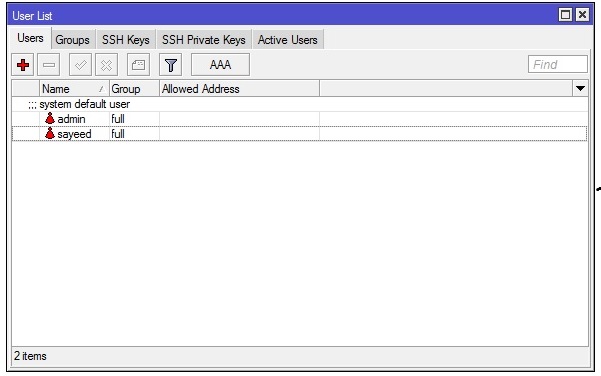
In this article we will learn how to manage MikroTik RouterOS users with proper permission.
By default admin user who has full permission is created with no password while running MikroTik RouterOS first time. So, after login first time it is your first duty to assign a strong password to admin user. I always prefer to remove admin user and creating another user with full permission because admin is a known user and a hacker will always try to login to your MikroTik Router with admin user. So, if you keep this admin user, half of his work is done and he just needs to guess your password to login in your MikroTik router. On the other hand, if you remove admin user, it will be very difficult to guess your full permission user as well as his password.
In Winbox software, users will be found in System > Users menu item and the following steps will show how to create a RouterOS user with Winbox software.
A new user has been created successfully. Sometimes you may need to edit your existing user’s property. Now I will show you how to edit your existing users.
User editing is easier than creating a new user. The following steps will show you how to edit your existing user’s property so easily.
Sometimes you may need to remove, disable or enable your MikroTik user. Removing (or disabling and enabling) user is so easy. Just right click on your desired user and then choose your option what you want to do from the appeared option panel.
User’s permission level is located under Group tab. By default three permission levels (called user Group) is created but you can create as many user permission levels as you want and can assign their policies. The following steps will show you how to create a new user group with policies.
| Policy Name | Description |
| local | User can log on locally via console |
| telnet | User can log on remotely via telnet |
| ssh | User can log on remotely via secure shell |
| winbox | User can log on remotely via winbox |
| ftp | User can log on remotely via ftp and send and retrieve files from the router |
| reboot | User can reboot the router |
| read | User can retrieve the configuration |
| write | User can retrieve and change the configuration |
| policy | Manage user policies, add and remove user |
| test | User can run ping, traceroute, bandwidth test |
| web | user can log on remotely via https |
| ppp | User can log on using ppp connections to the router (PPP, PPTP, PPPoE) |
| api | User can access router via api |
How to manage MikroTik RouterOS users has been discussed in this article. I hope you are now able to manage and secure your MikroTik Router easily. However, if you face any problem to manage your MikroTik RouterOS user, feel free to discuss in comment or contact with me from Contact page. I will try my best to stay with you.
 Первая помощь: терапия первой линии для педикулеза зависит от типа заражения. В общем, удаление вшей и гнид из одежды (вшей в теле) или волос (волосы или лобковые вши) является приоритетом лечения. Читать
Вязаные спицами ажурные ромбы могут быть основным узором пуловера, жакета или кардигана, палантина, связанных из пряжи для летнего сезона – хлопок, бамбук, лен, этим же узором могут быть связаны изделия из шерстяной, мохеровой или смесовой пряжи для холодного времени года.
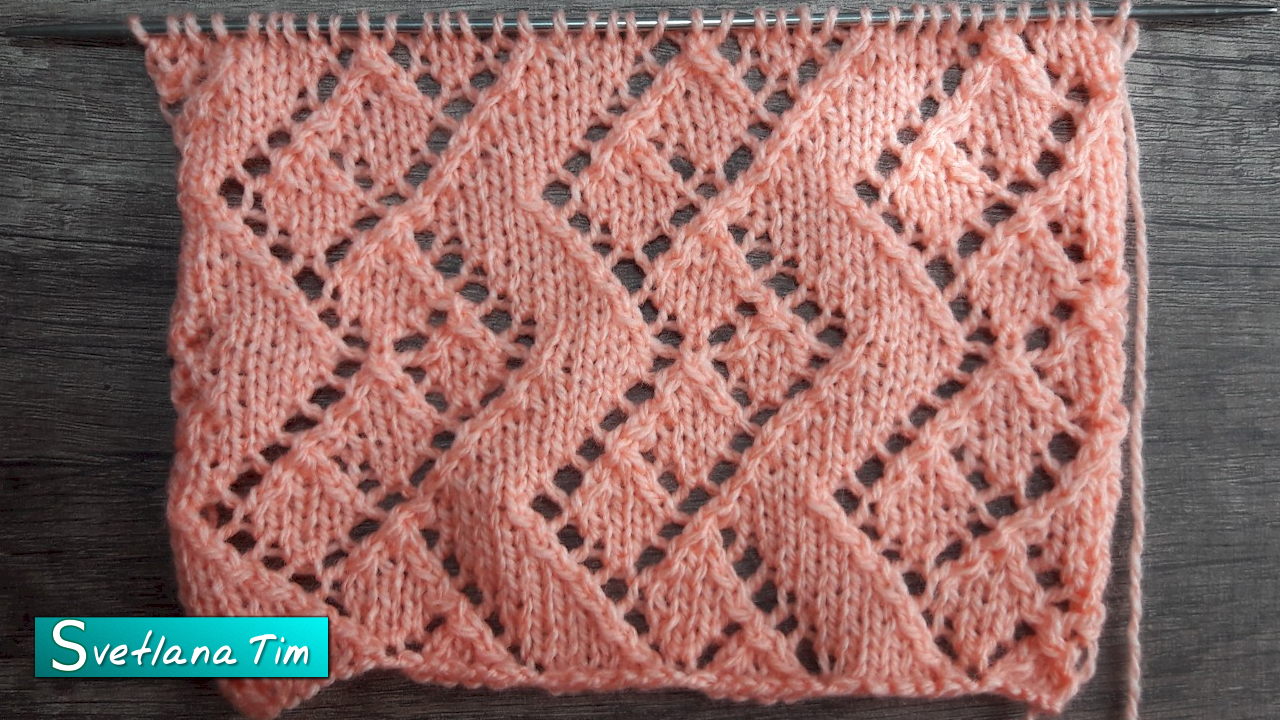 |
| Узор спицами ажурная дорожка из ромбов. |
 |
| Узор спицами ажурная дорожка из ромбов. Схема. |
 лицевая петля
 3 петли вместе лицевой, 2-я по центру (Снять две петли не провязывая как при лицевом вязании, нить за работой, провязать 3-ю петлю лицевой ,ввести левую спицу в снятые петли, накинуть их на провязанную и вытянуть петлю)
 накид
накид Две лицевые провязать вместе с наклоном влево (Первую петлю снять как при лицевом вязании, 2-ю петлю провязать лицевой и протянуть через неё снятую петлю)
 Две лицевые провязать вместе лицевой с наклоном вправо ( Спицу ввести во 2-ю петлю и 1-ю петлю, начиная со второй и провязать их вместе.)
 3 петли провязать вместе лицевой с наклоном вправо
 3 петли провязать вместе лицевой с наклоном влево ( 1 петлю снять не провязывая, 2 следующие провязать вместе за передние стенки, и протянуть полученную петлю через снятую)
Автор: Svetlana Tim
Дата публикации: 2017-10-20T11:21:00.002-07:00