Появилась необычная задача. Потребовалось открепить от всех публикаций в WordPress их «изображения записи». Но при этом требовалось оставить сами изображения в медиафайлах. Читать
Архив рубрики: WordPress
Как принудительно включить HTTPS в WordPress с плагином и без него?
Как эксперт по SEO и сам разработчик WordPress, я знаю важность использования HTTPS на нашем веб-сайте, а также понимаю критическое значение принудительного использования HTTPS на веб-сайтах WordPress. Если мы не сможем этого сделать после внедрения нового SSL на нашем веб-сайте, это повысит вероятность доступа к нашему веб-сайту в незащищенной (HTTP) версии путем прямого ввода URL-адреса или перехода по старым ссылкам в поисковой выдаче.
Как вернуть классические виджеты в WordPress 5.8+
Новый блочный редактор виджетов пока ещё не идеален, некоторые фильтры WooCommerce делает вобще недоступными, поэтому вернём классические виджеты. Читать
Обновить WordPress вручную
Не всегда возможно обновить WordPress в автоматическом режиме. При такой ситуации, нужно обновить WordPress вручную. Этот способ обновления имеет некоторые особенности о которых в этой статье.
Топ-10 бесплатных тем WordPress –
Успех вашего сайта WordPress во многом зависит от темы, которую вы выберете для создания веб-сайта. На официальном сайте wordpress.org представлены тысячи бесплатных и коммерческих тем. Выбрать один из множества — действительно непростая задача, и мы немного упростили ее для вас. Вот список 10 лучших бесплатных тем WordPress, доступных в репозитории WordPress. Вы можете скачать, установить и активировать эти темы на своем сайте прямо из админ-панели.
Лучшие бесплатные темы WordPress
Обратите внимание: бесплатных обедов не бывает. Все разработчики тем предлагают ограниченную версию для бесплатной загрузки и взимают плату за получение премиум-версии. Мы считаем, что одной из перечисленных ниже бесплатных тем достаточно для обычного информационного сайта, предлагающего блог и магазин. Если вы владеете или создаете полноценный бизнес-сайт, мы настоятельно рекомендуем проверить компании коммерческой тематики на официальном сайте wordpress.org вместо того, чтобы искать бесплатные. Мы также упомянули стоимость предлагаемых премиум-версий 10 лучших бесплатных тем. Если вы управляете несколькими сайтами или управляете агентством, рассмотрите возможность оптовой покупки премиальных пакетов тем WordPress.
Примечание: Цены, указанные для премиум-версий, указаны для годовых планов оплаты без каких-либо скидок, поскольку это будет сумма продления, которую вам необходимо заплатить.
1. Астра
Astra — самая популярная и легкая тема с более чем 1 миллионом активных установок. Эта тема от разработчика Brainstorm Force, который также предлагает множество других популярных продуктов, таких как Spectra, Schema Pro, Convert Pro, Starter Templates и т. д. Вы можете получить бесплатную версию Astra из репозитория тем WordPress с ограниченными функциями. Этого достаточно, чтобы создать профессионально выглядящий бизнес-сайт или блог с использованием предопределенных шаблонов. Вы можете приобрести надстройку Pro за 59 долларов США, чтобы получить дополнительные функции, такие как гибкая типографика, пользовательские макеты, пользовательские крючки и профессиональные шаблоны. Полный обзор темы Astra можно найти здесь.
 Бесплатная тема Астра
2. Создать Пресс
На самом деле GeneratePress должна быть верхней темой в нашем списке из-за ее оригинального дизайна и долгой доступности до темы Astra. Тем не менее, он имеет ограниченные бесплатные функции, например, вы не можете удалить авторские права в нижнем колонтитуле, а последние демо-версии в первую очередь ориентированы на продажу плагина блоков Generateblocks Pro. Это по-прежнему хороший выбор для тех, кто хочет создать веб-сайт со сверхбыстрой загрузкой страниц. Когда мы обновляем эту статью, тема GeneratePress имеет более 600 тысяч активных установок. Это полностью адаптивная и легкая тема с несколькими вариантами боковой панели. Бесплатная версия полностью совместима с основными плагинами, такими как WooCommerce, BuddyPress, bbPress и т. д. Премиум-версия обойдется вам в 59 долларов с дополнительными функциями, такими как элементы, заголовок страницы, макет кладки и дополнительные меню. Ознакомьтесь с обзором темы GeneratePress, чтобы понять все ее возможности.
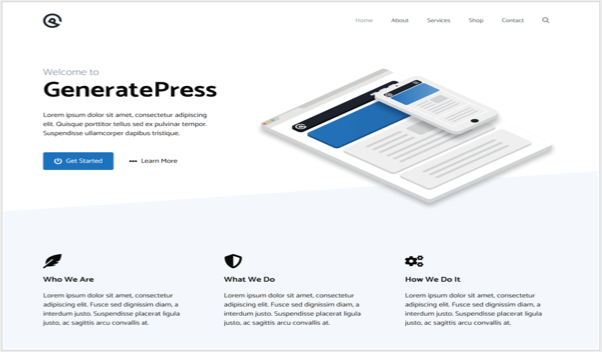 Бесплатная тема GeneratePress
3. Каденс
Если вы любите блоки Гутенберга, возможно, вы слышали о плагине Kadence Blocks. Тема Kadence принадлежит тому же разработчику и представляет собой легкую, адаптивную и многофункциональную тему, активно установленную на более чем 200 тысячах сайтов WordPress. Он предлагает все функции, необходимые для настройки бесплатного сайта, такие как типографика, метаданные, макеты, а также несколько бесплатных стартовых шаблонов. Вы можете перейти на премиум-версию за 79 долларов, чтобы получить дополнительные надстройки заголовков, пользовательские шрифты и вставку кода с помощью хуков. Ознакомьтесь с полным обзором темы Kadence, чтобы узнать обо всех ее функциях.
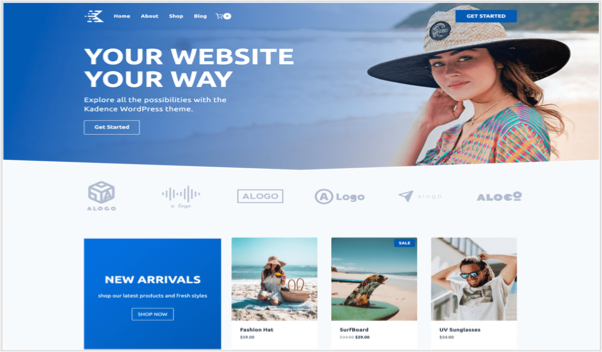 Каденс WP тема
4. ОкеанWP
OceanWP — еще одна легкая, оптимизированная для SEO тема для запуска вашего сайта WordPress. Он предлагает функции для настройки верхнего и нижнего колонтитула, макета блога и магазина WooCommerce. Существуют также социальные и другие дополнительные виджеты для повышения коэффициента конверсии вашего сайта.
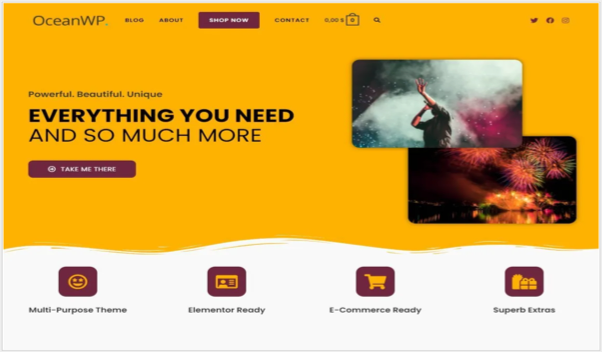 Тема OceanWP
Профессиональная версия обойдется вам в 54 доллара и включает в себя пакет из 7 бесплатных и 14 профессиональных расширений.
5. Неве
Неве от популярного разработчика Themeisle, который также предлагает еще одну популярную тему Hesita. Это минималистичная легкая тема со всеми необходимыми опциями для настройки макетов. Вы можете создать блог, бизнес или магазин WooCommerce с минимальным дизайном, используя бесплатную тему. Профессиональная версия предлагает дополнительные надстройки для настройки макетов блога, верхнего и нижнего колонтитула, Elementor и WooCommerce.
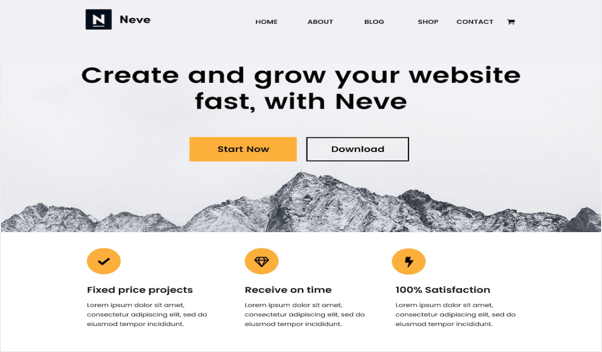 Бесплатная тема WordPress Neve
Профессиональная версия обойдется вам в 99 долларов в год.
6. Блокси
WordPress представил редактор блоков Gutenberg несколько лет назад в версии 5.0. Однако не так уж много тем, доступных для использования блоков и Блокси является одним из этой категории. Вам понравится эта тема, только если вы предпочитаете использовать блоки Гутенберга, а не старый классический редактор. Вы можете использовать один из стартовых шаблонов, чтобы запустить сайт и настроить макет, используя параметры блока, доступные в редакторе.
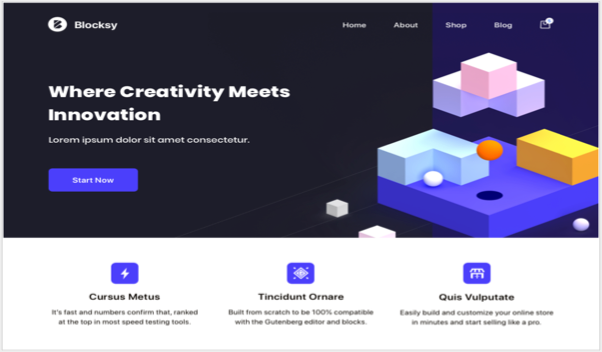 Блочная тема
Профессиональная версия Blocksy доступна с крючками, конструктором заголовков и настраиваемыми опциями боковой панели, которые обойдутся вам в 49 долларов.
7. Хьюман
Раньше дни, Хьюман была одной из самых популярных тем, доступных в репозитории тем WordPress. Однако вышеперечисленные темы используют упрощенную концепцию и завоевали популярность. Вы по-прежнему можете использовать тему Hueman для бесплатного создания сайтов WordPress в журнальном стиле. Вы можете изменить макет с помощью правой боковой панели, левой боковой панели или трех столбцов. Автор также предлагает дополнительный плагин или шорткоды и плавающие кнопки социальных сетей. Он поддерживает избранный слайдер, количество комментариев к избранным изображениям, настройку верхнего и нижнего колонтитула. Хотя он полностью адаптивный, при использовании с тремя столбцами правая боковая панель исчезнет на мобильных устройствах, и вам придется щелкнуть стрелку, чтобы просмотреть правую боковую панель в виде слайда на iPad.
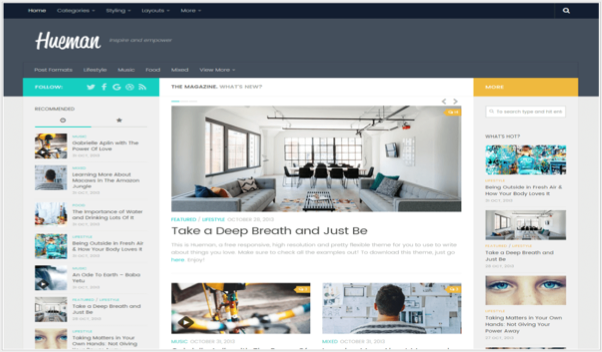 Тема Hueman WordPress
Существует также профессиональная версия, доступная за 49 долларов, ориентированная на тему, оптимизированную для мобильных устройств.
8. Колормаг
Колормаг — самая популярная тема в стиле бесплатных журналов, используемая для быстрого и стильного создания новостных, журнальных, технологических и общих блогов. Это также одна из старейших журнальных тем, на которой работает более 70 тысяч сайтов WordPress. Вы можете настроить каждую категорию так, чтобы она отображалась в разных цветах, что делает домашнюю страницу и страницы архива привлекательными. Он поддерживает WooCommerce, полностью адаптивный, имеет слайдер и другие виджеты.
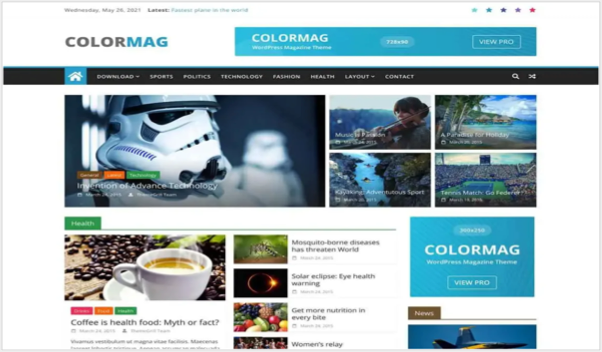 Тема журнала ColorMag
Бесплатную версию можно загрузить из репозитория WordPress, а профессиональную версию с расширенными функциями можно приобрести за 69 долларов на сайте разработчика.
9. Отзывчивый
Отзывчивый — бесплатная тема WordPress, на которой работает более 30 тысяч веб-сайтов. Он полностью сосредоточен на обеспечении гибкого адаптивного макета, чтобы ваш сайт выглядел идеально на всех устройствах. Существует более 30 стартовых шаблонов для создания блога, портфолио, магазина WooCommerce или бизнес-сайта.
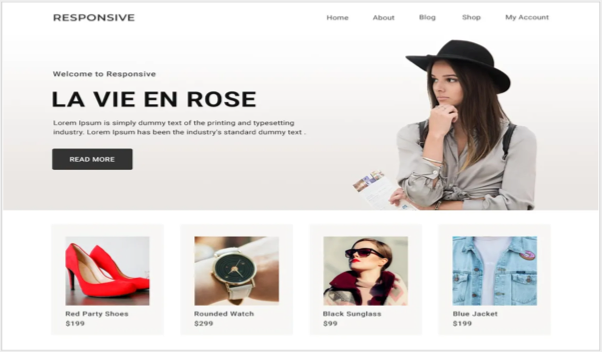 Адаптивная тема WordPress
Профессиональная версия доступна за 59 долларов США с дополнительными функциями и более чем 150 готовыми к импорту шаблонами.
10. Добродетель
Достоинство — это тема Bootstrap от того же разработчика тем Kadence. С помощью WooCommerce вы можете создать витрину портфолио, бизнес-сайт и интернет-магазин. Бесплатная версия позволяет изменять макет блога, настраивать меню заголовка и настраивать параметры типографики.
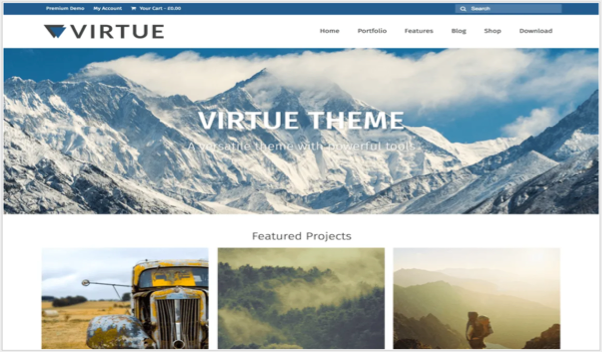 Тема WordPress Добродетель
Премиум-версия темы обойдется вам в 75 долларов в год и включает плагин Kadence Blocks Pro.
Краткое содержание
Ежедневно сотни разработчиков выпускают бесплатные темы в репозитории WordPress и на сторонних сайтах. Приведенный выше список является просто справочным, основанным на популярности. Выбор лучшей темы для вашего сайта зависит от ваших потребностей, и мы всегда рекомендуем использовать премиум-версию. Потому что вы можете получить надлежащую поддержку в премиум-версии, тогда как поддержка бесплатных тем не всегда гарантируется. Большинство бесплатных тем WordPress, которые были популярны несколько лет назад, ушли с рынка с появлением Gutenberg и фокусом скорости страниц от Google. Поэтому обязательно выбирайте тему со стандартными функциями без необходимости использования дополнительных пользовательских плагинов. Это поможет вам без проблем переключать тему при необходимости.
2024-04-07T21:16:31
Сайтостроение
Руководство по настройкам WP Rocket для ускорения сайта WordPress –
WP Rocket — один из лучших плагинов для кэширования и оптимизации, доступных для WordPress. Он доступен только в виде премиум-версии и, несомненно, повысит скорость вашего сайта на новый уровень. Однако вам необходимо правильно настроить плагин, чтобы передавать основные веб-показатели в Google PageSpeed Insights и улучшать рейтинг вашего сайта в поисковых системах, поскольку скорость официально является одним из факторов ранжирования для Google. Если вы приобрели плагин или планируете приобрести, вот оптимизированные настройки WP Rocket для ускорения вашего сайта.
Мы используем этот плагин более 5 лет, как вы можете видеть в приведенных ниже деталях счета, и он хорошо работает в облачном хостинге SiteGround. Итак, описанные здесь настройки основаны на нашем опыте и обновлены для последней версии WP Rocket.
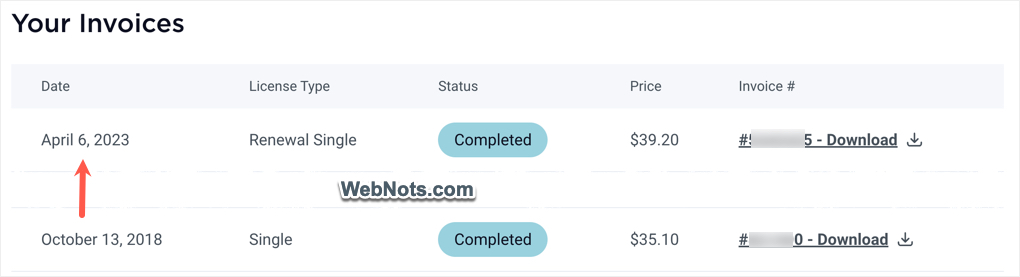 Счета WP Rocket
Настройки WP Rocket
После установки и активации плагина перейдите в раздел «Настройки > WP Rocket», чтобы просмотреть все доступные варианты оптимизации скорости. Страницы настроек плагина содержат три столбца:
- Левая боковая панель с различными вкладками для навигации и настройки параметров плагина.
- Средний раздел содержит подробные параметры для каждой вкладки.
- Правая боковая панель, показывающая быстрые действия или обучающие материалы.
Если вы чувствуете, что область перегружена, перейдите в любой из разделов левой боковой панели и отключите опцию «Показать боковую панель», отображаемую вверху средней секции. Прежде чем объяснять каждый раздел, приведем краткий обзор настроек WP Rocket.
Настройки WP RocketФункцииПанель управленияПоказывает лицензию и другие быстрые ссылки. Кэш Мобильный и пользовательский кеш. Оптимизация файлов. Уменьшите и объедините CSS и JS, удалите неиспользуемый CSS или создайте критический CSS и отложите/задержите JS. MediaЛенивая загрузка изображений и видео. Предварительная загрузка. Предварительная загрузка шрифтов, кеша, ссылок и предварительной загрузки. DNS.Расширенные правилаДобавление исключений из кеша.База данныхУдаление версий, автосохранение, спам-комментарии и очистка базы данных по расписанию.CDNEable RocketCDN (дополнительное дополнение премиум-класса) HeartbeatControl Настройки Heartbeat APIДополненияБесплатные надстройки для Varnish, обнаружения WebP, Cloudflare и Sucuri.Оптимизация изображения требует Imagify плагин.ИнструментыНастройки импорта/экспорта, откат и оптимизация шрифтов GoogleРуководстваБыстрые ссылки на видеоурокиMeta BoxВключение или отключение функций на уровне страницы
Помните, вам не нужно активировать все параметры и обязательно протестируйте свой сайт после настройки плагина.
1. Панель управления — помощь, информация об учетной записи.
Раздел панели мониторинга содержит информацию об истечении срока действия лицензии и быстрые ссылки для выполнения различных действий. Вы также найдете скидку на продление в верхней части этого раздела, когда приближается дата истечения срока действия лицензии.
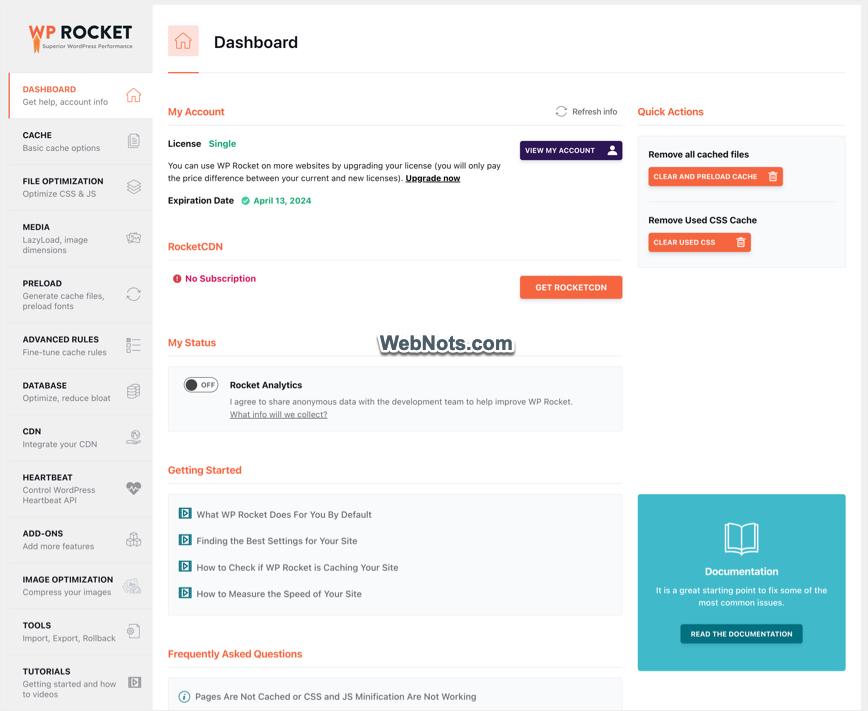 Панель управления плагином WP Rocket
На правой боковой панели вкладки «Панель управления» есть несколько полезных ссылок для очистки и предварительной загрузки кеша, а также удаления неиспользуемого CSS. Если вы отключили правую боковую панель, вы можете получить доступ к этим параметрам из верхней строки меню.
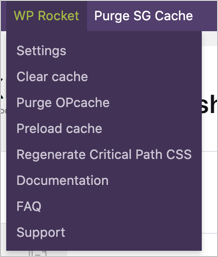 Меню администратора WP Rocket
С точки зрения настроек вы можете отключить опцию «Rocket Analytics» в разделе «Мой статус». Это поможет отказаться от отправки анонимных данных с вашего сайта разработчику WP Rocket. Доступны часто задаваемые вопросы, ссылки для начала работы и руководства, позволяющие быстро получить ответы на ваши вопросы. Если вы не нашли ответа, нажмите кнопку «Помощь», чтобы выполнить поиск и найти дополнительные статьи.
2. Кэш – основные параметры кэша
Ваши фактические настройки начинаются отсюда. Внесенные вами изменения будут применены к вашему сайту только после нажатия кнопки «Сохранить изменения». Помните, WP Rocket автоматически включит кэширование на уровне страницы, включит сжатие и будет обслуживать статические HTML-страницы и нет возможности отключить кэширование на уровне страниц всего сайта. Вы можете исключить из кэширования на основе правил, как описано в разделе 6, и исключить отдельные страницы, как описано в разделе 14.
- Мобильный кэш – установите флажок «Включить кэширование для мобильных устройств», чтобы кэшировать мобильные страницы вашего сайта. Опцию «Отдельные файлы кэша для мобильных устройств» оставьте неактивной. Как ясно сказано там, при использовании адаптивных тем вам не требуется отдельное кеширование для мобильных устройств. Однако вам необходимо включить эту опцию при использовании специальной мобильной темы с помощью таких плагинов, как Jetpack. Кроме того, популярные темы, такие как «Газета», предлагают отдельные темы для мобильных устройств. Итак, вам необходимо включить отдельную опцию мобильного кэширования в WP Rocket, если вы включили ее в настройках своей темы.
Примечание: Mobile в WP Rocket обозначает смартфоны. Если вы хотите, чтобы плагин рассматривал планшеты как мобильные телефоны и обслуживал страницы, кэшированные на мобильных устройствах, вам необходимо установить вспомогательный плагин с сайта GitHub. В противном случае WP Rocket не будет кэшировать страницы для планшетов, и посетители с планшетов будут видеть некэшированные страницы.
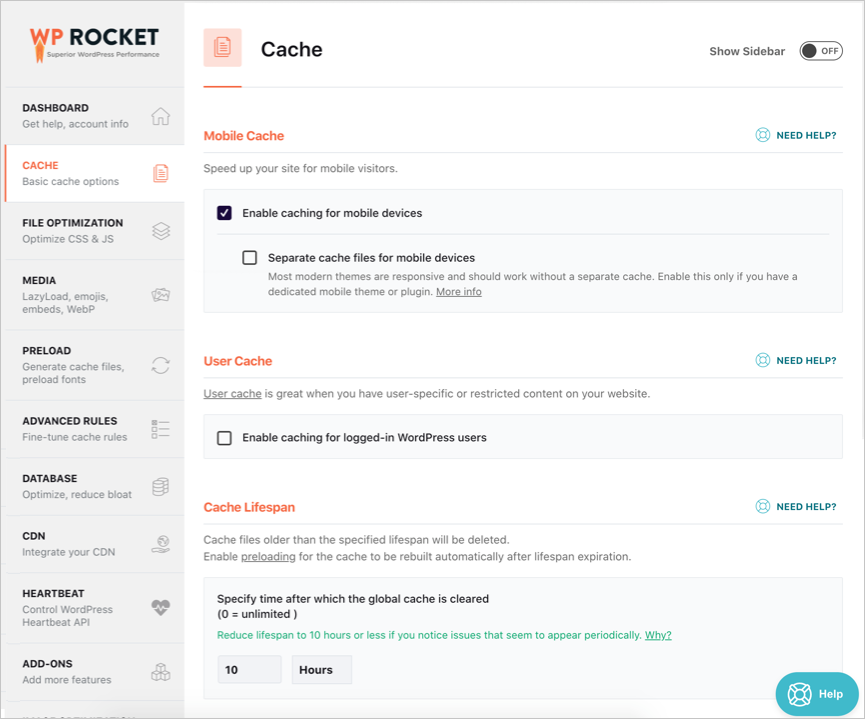 Оптимизация кэша
- Кэш пользователя – пользовательский кэш позволяет обслуживать кэшированные страницы для вошедших в систему пользователей. Это полезно, если у вас есть веб-сайты на основе подписки, и многие пользователи входят в систему и просматривают ваш контент. В противном случае не включайте эту опцию.
Примечание: Отдельный мобильный кеш и пользовательский кеш — это первые два параметра, которые необходимо отключить, если у вас возникает конфликт с другими плагинами кеширования.
- Срок службы кэша – WP Rocket автоматически удалит все кэшированные файлы по истечении срока, указанного вами в сроке службы кэша. У этой настройки автоматического удаления кэша есть веская техническая причина. WordPress использует nonce который представляет собой автоматически сгенерированный ключ в HTML-коде для проверки определенных действий. Этот одноразовый ключ действителен в течение 12 часов и будет повторно создан в течение 24 часов. Чтобы избежать просмотра страницы с истекшим nonce, необходимо очистить кеш. WP Rocket по умолчанию устанавливает срок жизни кэша 10 часов. Однако для многих сайтов этого будет слишком мало, поскольку плагин удалит весь кеш и начнет предварительную загрузку страниц каждые 10 часов. Поэтому мы рекомендуем увеличить время до 24 часов или даже дней, если вы не часто публикуете/изменяете контент. Если вы видите какие-либо проблемы, измените этот параметр на значение менее 10 часов, чтобы не было проблем с одноразовыми номерами.
Обратите внимание, что WP Rocker не кэширует объекты..
3. Оптимизация файлов — оптимизируйте CSS и JS.
Будьте осторожны при включении настроек в разделе «Оптимизация файлов». Это может нарушить макет вашего сайта, особенно если вы используете тему на основе jQuery. Этот раздел состоит из двух частей: одна для файлов CSS и другая для файлов JavaScript.
CSS-файлы
- Минимизировать CSS-файлы – включение этой опции поможет вам удалить ненужное пространство и комментарии из CSS и уменьшить размер страницы.
- Оптимизируйте доставку CSS – здесь у вас есть два варианта – загружать CSS асинхронно, чтобы сгенерировать критический CSS для каждого типа сообщений на вашем сайте, или удалить неиспользуемый CSS. Вы можете включить только одну опцию, и это поможет вам преодолеть проблемы с блокировкой рендеринга CSS в Google PageSpeed и других инструментах измерения скорости. Для достижения наилучших результатов в Google PageSpeed вы можете включить опцию удаления неиспользуемого CSS на своем сайте. Хотя это может привести к поломке некоторых элементов, ваша скорость может резко возрасти, если на страницу будет загружен только использованный CSS. Если у вас возникли проблемы с удалением CSS, прочтите эту статью о том, как добавить исключения для страниц и разделов, таких как продукты WooCommerce.
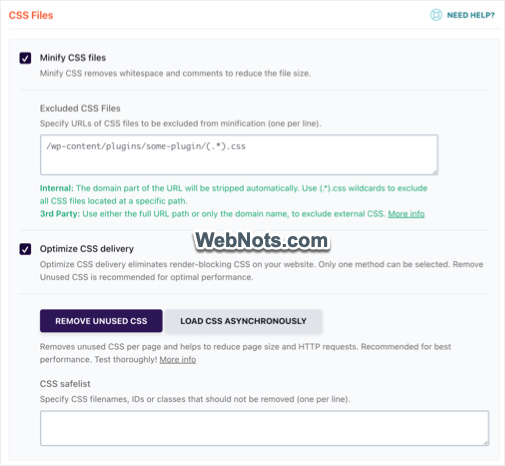 Оптимизация CSS WP Rocket
Раньше WP Rocket использовал большие таблицы базы данных для хранения используемого CSS, который теперь заменен на кэширование на основе файлов. Обязательно отслеживайте свой кеш (в папке /wp-content/), чтобы избежать ограничения количества файлов или каталогов, установленного вашим хостинг-провайдером.
Примечание: Параметр «Объединить файлы CSS» удален из последней версии плагина в пользу удаления неиспользуемой функции CSS. Кроме того, сегодня все хостинг-серверы поддерживают HTTP/2 и хорошо работают с параллельными HTTP-запросами.
JavaScript-файлы
Этот раздел имеет такие же настройки, как и раздел «CSS-файлы».
- Минимизировать файлы JavaScript – включите эту опцию, чтобы удалить ненужный контент из всех ваших файлов JS.
- Объединение файлов JavaScript – не включайте эту опцию, поскольку большинство серверов поддерживают протокол HTTP/2.
- Загрузка JavaScript отложена – включите это, чтобы устранить проблемы со скриптами блокировки рендеринга в Google PageSpeed Insight. Это переместит файлы JS в раздел нижнего колонтитула или добавит атрибут «defer» в исходный код, чтобы избежать блокировки загрузки контента.
- Задержать выполнение JavaScript — включите эту опцию, чтобы задержать все файлы JS до взаимодействия с пользователем. Вы можете использовать это при использовании сторонних скриптов, таких как AdSense и Analytics. Хотя это поможет пройти Core Web Vitals и получить 100/100 в PageSpeed, это повлияет на ваши доходы от AdSense.
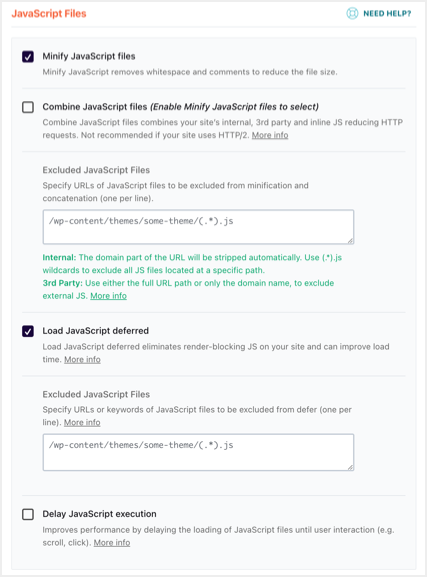 Оптимизация JS-файлов в WP Rocket
После сохранения изменений протестируйте свой сайт в различных браузерах, чтобы убедиться, что он загружается правильно. Если вы видите, что такие функции, как пользовательские таблицы данных и диаграммы, не работают, обязательно добавьте список безопасного режима для jQuery в параметр задержки JS. Кроме того, вы также можете исключить файлы CSS или JavaScript, которые, по вашему мнению, нарушают работу сайта.
4. Медиа – ленивая загрузка
На этой вкладке «Медиа» вы можете оптимизировать настройки изображений и других медиафайлов, таких как видео YouTube. Последняя версия WP Rocket также включает в себя возможность отложенной загрузки фоновых изображений, встроенных с помощью CSS.
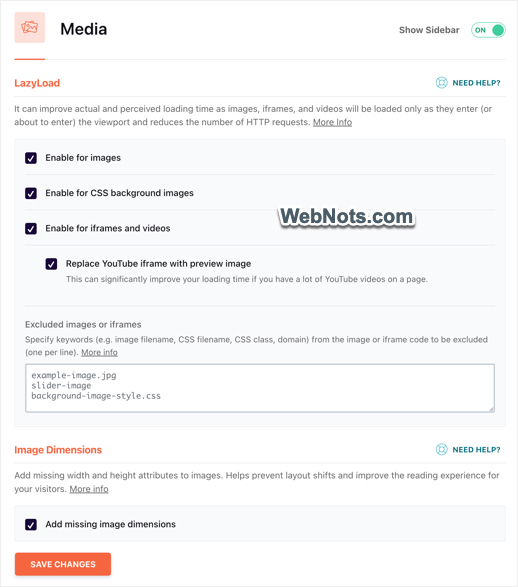 Настройки мультимедиа в WP Rocket
- LazyLoad – включите отложенную загрузку изображений, фоновых изображений CSS, iframe и видео и замените iframe YouTube опциями предварительного просмотра изображения. Ленивая загрузка поможет вам остановить загрузку изображений за пределами видимого экрана браузера и загружать их, когда пользователь прокручивает страницу ближе к изображениям. Обязательно проверьте, правильно ли он работает на вашем сайте. Если вы обнаружите какие-либо проблемы с отложенной загрузкой в WP Rocket, добавьте имена файлов изображений в поле исключения.
- Размеры изображения — включите опцию «Добавить недостающие размеры изображения», чтобы автоматически добавлять атрибуты высоты и ширины для изображений. Это поможет уменьшить совокупные проблемы со сдвигом макета и улучшить показатель скорости в Google PageSpeed Insights.
Ранее WP Rocket предлагал возможность отключить скрипт эмодзи и встроить его в этот раздел. Однако эти параметры были удалены из плагина и больше не доступны.
5. Предварительная загрузка — создание файлов кэша, предварительная загрузка шрифтов.
Предварительная загрузка — это функция сканирования и кэширования страниц после очистки кэша. Отправной точкой предварительной загрузки контента является ваш XML-файл Sitemap, и плагин просканирует все ссылки внутри каждого URL-адреса.
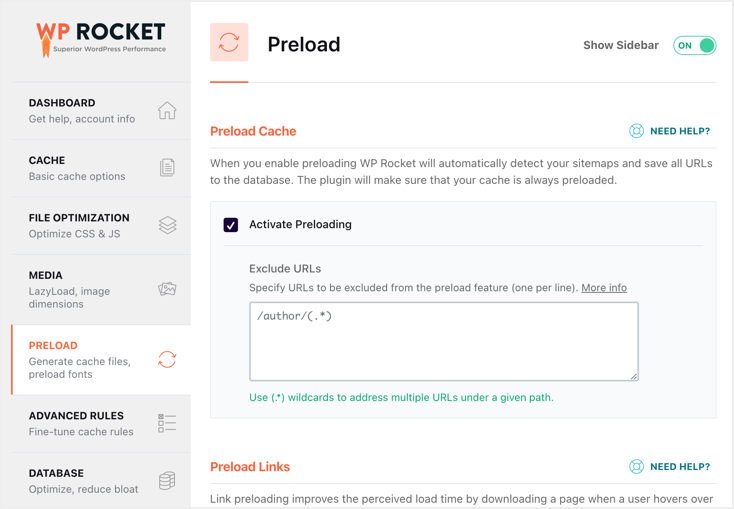 Настройки предварительной загрузки в WP Rocket
- Активировать предварительную загрузку – включите опцию «Активировать предварительную загрузку», и WP Rocket автоматически обнаружит XML-карту сайта, созданную с помощью популярных плагинов SEO, таких как Yoast SEO. При необходимости вы можете исключить URL-адреса в текстовом поле.
- Предварительная загрузка ссылок – включение «Предварительной загрузки ссылок» позволит WP Rocket получать связанный контент, когда пользователь наводит курсор на ссылку в течение 100 миллисекунд или более.
- Предварительная выборка DNS-запросов – предварительная выборка позволяет плагину получать сторонние домены, чтобы сократить время подключения. Введите URL-адреса Google Fonts или URL-адреса видео YouTube в текстовое поле для предварительной загрузки.
- Предварительная загрузка шрифтов — Запросы ключей предварительной загрузки — одна из проблем, с которыми вы столкнетесь в Google PageSpeed при использовании собственных шрифтов из CSS. Вы можете скопировать и вставить соответствующие URL-адреса шрифтов на своем сайте в текстовое поле, чтобы устранить проблему и повысить скорость.
Примечание: Обязательно укажите правильный формат URL-адреса в текстовых полях. Например, WP Rocket не требуется часть HTTP для предварительной загрузки, в то время как вам нужно ввести относительный URL-адрес (игнорируя домен) для предварительной загрузки шрифтов на вашем сайте.
6. Расширенные правила – точная настройка правил кэша
Расширенные правила помогут вам поддерживать страницы, файлы cookie и пользовательские агенты, чтобы плагин никогда не кэшировал их. WP Rocket никогда не будет автоматически кэшировать корзину WooCommerce, страницу оформления заказа и мою учетную запись. Поэтому в большинстве случаев вам не нужно ничего вводить на этой странице и оставить настройки как есть.
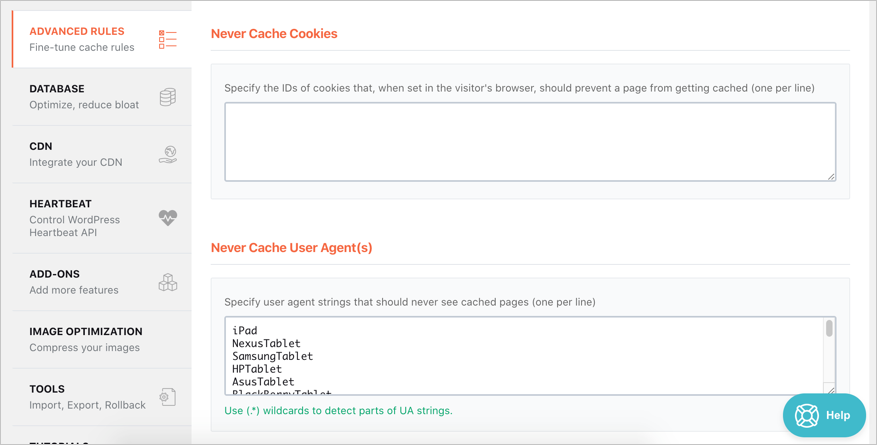 Расширенные настройки правил в WP Rocket
- Никогда не кэшируйте URL-адреса – введите URL-адреса страниц, которые плагин не должен кэшировать. Хороший пример: если вы изменили URL-адрес входа в WordPress с помощью плагинов безопасности, введите новый URL-адрес входа в текстовое поле.
- Никогда не кэшируйте файлы cookie – некоторым пользователям нужны файлы cookie для динамического изменения или проверки контента. Например, если у вас есть система входа на основе файлов cookie, введите идентификатор файла cookie для игнорирования кэширования.
- Никогда не кэшируйте пользовательские агенты – WP Rocket автоматически заполнит все пользовательские агенты планшетов. Как упоминалось выше, плагин не будет кэшировать страницы для планшетов, используя эту настройку. Если вы включили планшет в качестве мобильного устройства с помощью отдельного вспомогательного плагина, вам необходимо удалить все пользовательские агенты планшета из этого списка. Кроме того, вы можете поддерживать любой другой пользовательский агент, который будет обслуживать некэшированные страницы.
- Всегда удалять URL-адреса – указывайте URL-адреса в текстовом поле для очистки кеша при каждой публикации или обновлении контента. Помните, WP Rocket сделает это автоматически для домашней страницы.
- Строки запроса к кэшу – заставить WP Rocket кэшировать URL-адреса со строками запроса.

7. База данных: оптимизация, уменьшение раздувания
WP Rocket позволяет очищать версии, автоматические черновики, удаленные сообщения, спам-комментарии, удаленные комментарии, просроченные переходные процессы и все временные файлы. У вас есть возможность оптимизировать таблицы базы данных и запланировать очистку базы данных через определенные промежутки времени. Мы рекомендуем не настраивать расписание и выполнять очистку вручную после создания резервной копии базы данных. Поскольку WP Rocket не предлагает возможности резервного копирования вашей базы данных, вам придется использовать другие плагины или загрузить базу данных из учетной записи хостинга вручную. Кроме того, действие очистки необратимо, поэтому не следует настраивать автоматические расписания без резервной копии для восстановления.
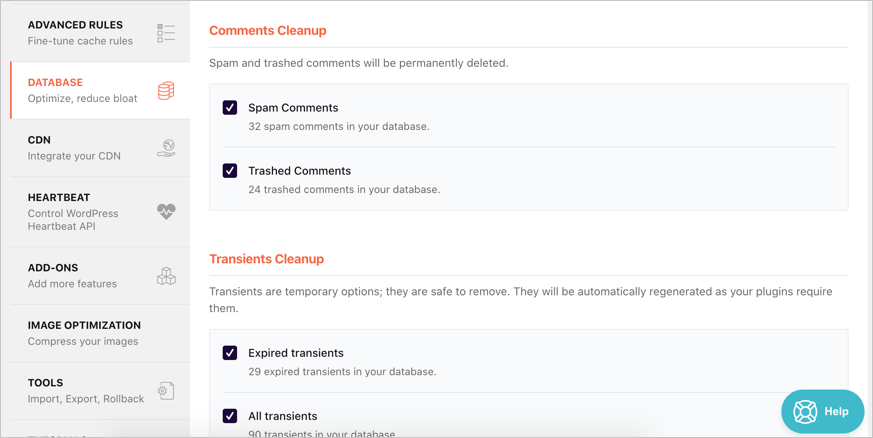 Настройки оптимизации базы данных
8. CDN – интегрируйте свой CDN
Если у вас есть CDN или вы приобрели подписку RocketCDN (которая использует StackPath), включите здесь опцию сети доставки контента. Вы можете добавить отдельные CNAME для изображений, скриптов и CSS или использовать один CNAME для всех файлов. Плагин также позволяет исключать файлы из обслуживания через CDN.
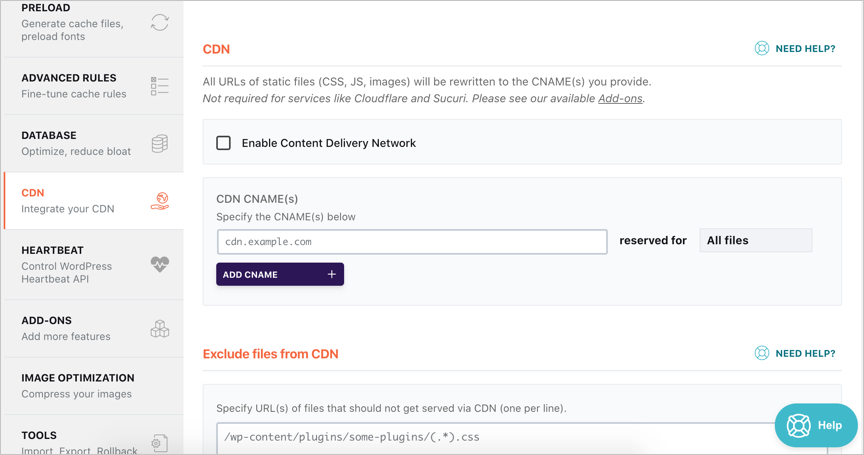 Настройки RocketCDN
Обратите внимание, что CNAME не требуется, если вы используете CDN, например Cloudflare или Sucuri. WP Rocket также предлагает дополнительные дополнения для этих двух сетей. Если вы находитесь на SiteGround, ознакомьтесь с нашей статьей о том, будет ли WP Rocket работать с плагином SG Optimizer в SiteGround.
9. Heartbeat — управляйте API Heartbeat WordPress.
API Heartbeat в WordPress позволяет вам получать обновления в режиме реального времени, например о продажах, на вашей панели управления. Если вам это не нужно, отключите Heartbeat API в этом разделе.
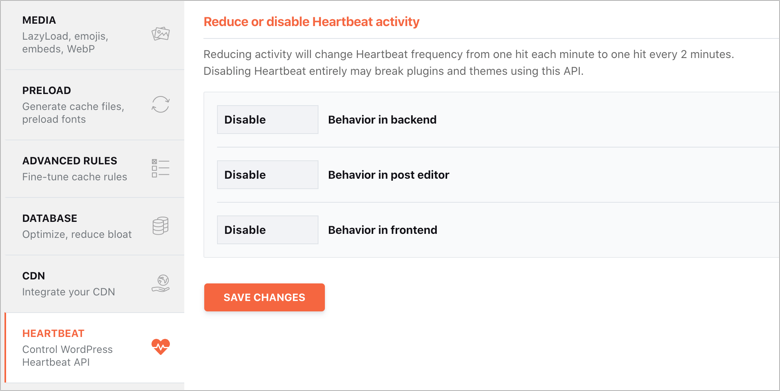 Отключить Heartbeat API в WP Rocket
Выберите опцию «Control Heartbeat», а затем «Отключить» для серверной части, редактора сообщений и внешнего интерфейса.
10. Дополнения – добавьте больше функций
WP Rocket предлагает следующие дополнения.
- Лак – если вы используете кэширование Varnish на сервере, включите эту опцию. Если вы не уверены, использует ли ваш сервер Varnish, уточните у своего хостинг-провайдера, прежде чем включать эту опцию.
- Совместимость с WebP – если у вас есть отдельный плагин для создания изображений WebP, включите их кеширование в WP Rocket, используя эту опцию.
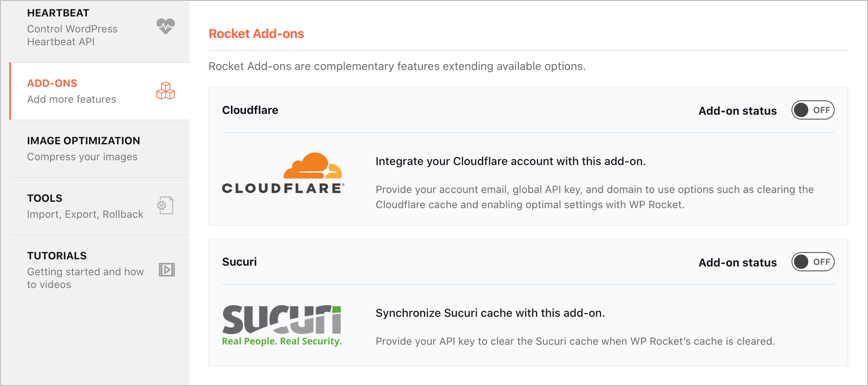 Дополнения WP Rocket
- Облачное сияние – включите это дополнение, если вы используете Cloudflare CDN. Вам необходимо подключиться к своей учетной записи Cloudflare, предоставив глобальный ключ API. Это помогает синхронизировать такие настройки, как минимизация и очистка кеша.
- Соки – включите, если вы используете кеширование Sucuri на своем сайте. Этому дополнению также требуется ключ API, и оно помогает очищать кеш Sucuri, автоматически синхронизируя кеш WP Rocket.
11. Оптимизация изображений – сжимайте изображения
WP Rocket предлагает еще один плагин под названием Imagify для оптимизации ваших изображений. Однако это плагин с ограниченными возможностями, который вам необходимо обновить, чтобы получить полные функции. Imagify позволяет сжимать размер 25 МБ для бесплатной учетной записи в месяц и требует премиум-обновления для получения дополнительной квоты. Если у вас сайт меньшего размера, установите плагин Imagify и выполните настройку на странице настроек этого плагина.
Как премиум-клиент WP Rocket, мы считаем, что это ненужное дополнение и не должно быть частью страницы настроек (например, WP Rocket CDN). Вы можете просто игнорировать эту страницу настроек и использовать другие плагины, такие как WP Smush или Speed Optimizer для пользователя SiteGround.
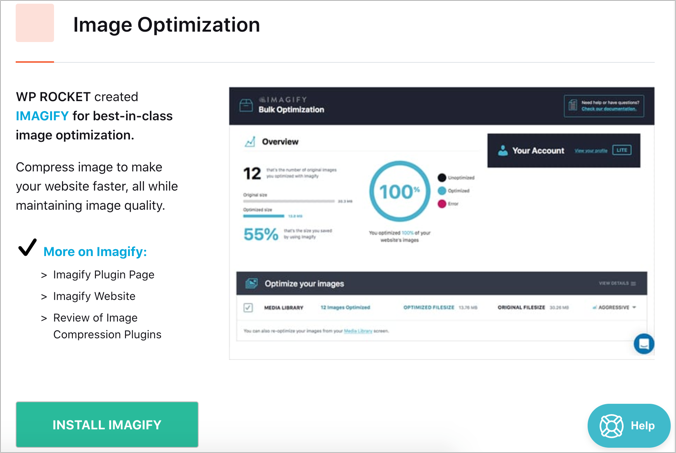 Вариант изображения
12. Инструменты – импорт, экспорт, откат.
В разделе «Инструменты» есть несколько полезных опций:
- Экспорт настроек – нажмите кнопку «Загрузить настройки», чтобы загрузить полные настройки плагина в виде файла JSON.
- Импортировать настройки – используйте загруженный файл JSON для импорта настроек одним щелчком мыши.
- Откат — если что-то пойдет не так после обновления плагина до более новой версии, вы можете откатиться к предыдущей версии, нажав кнопку «Переустановить версию xxxx».
- Обновить список включений и исключений – он будет автоматически обновляться раз в неделю для совместимости с другими плагинами. Однако вы также можете обновить список вручную, нажав эту кнопку.
Импорт и экспорт полезны, если вы хотите использовать плагин на другом сайте и быстро загрузить настройки. Кроме того, вы всегда можете сохранить загрузку настроек текущей рабочей версии. В случае каких-либо проблем при изменении настроек вы можете просто импортировать настройки вместо отката плагина.
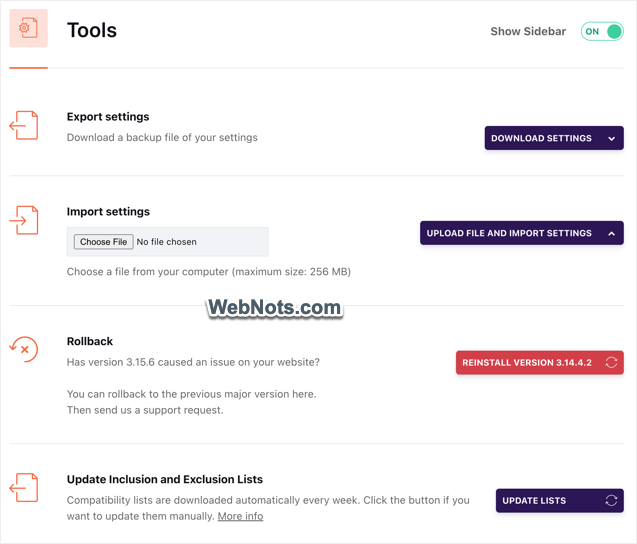 Раздел инструментов WP Rocket
Обратите внимание, что WP Rocket будет работать на вашем локальном сайте с тем же лицензионным ключом. Следовательно, вы можете импортировать/экспортировать настройки с действующего сайта на локальный хост для тестирования вашего сайта. Ранее была возможность включить оптимизацию шрифтов Google, чтобы объединить запросы к файлам шрифтов и сократить сетевой цикл. Однако эта опция удалена и недоступна в последней версии плагина.
13. Учебники
В этом разделе вы можете найти несколько полезных видеоуроков. Вы можете просматривать эти видео во всплывающем окне в панели администратора, не покидая веб-сайт.
14. Настройки на уровне страницы
WP Rocket добавит в редактор (как Gutenberg, так и Classic) мета-поле, которое вы сможете использовать для изменения настроек уровня отдельных страниц. Например, вы можете отключить отложенную загрузку или удалить неиспользуемую опцию CSS для одного сообщения, в то время как эти опции включены для всего сайта на странице настроек плагина. Это также полезно для исключения страницы из кэширования, когда макет страницы нарушен из-за задержки JS или объединения файлов CSS.
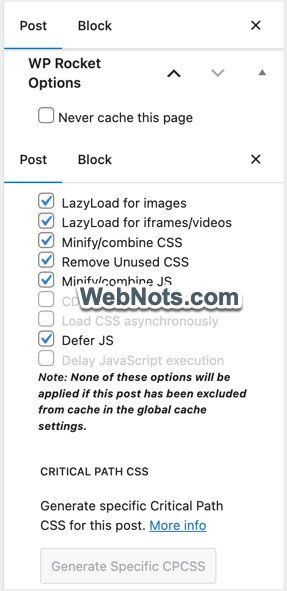 Мета-окно настроек уровня страницы WP Rocket
Если вы пропустили мета-поле, обязательно включите «Параметры WP Rocket» в «Параметры экрана» в классическом редакторе и в разделе «Параметры > Настройки > Панели» в Гутенберге.
Заключение
WP Rocket предлагает множество настроек для оптимизации вашего сайта WordPress. Вы должны быть осторожны при включении необходимых настроек, чтобы максимально эффективно использовать плагин. Мы надеемся, что приведенное выше руководство окажется полезным для вас при настройке плагина. Вы также можете ознакомиться с полным обзором плагина WP Rocket, прежде чем принимать решение о покупке.
2024-04-07T19:40:04
Сайтостроение